How To Create and Manage a Translation Memory Properly?

translation memory

Translation Memories, or TM, are a key asset in translation and localization. They are often talked about and deemed essential, as they allow to maintain consistency across translated content and can significantly speed up the translation process. But why and how?

How, and why translation memories can be used for automatic translation? What are their benefits, and do they apply everywhere? How to create and maintain them? In this article, we will bring you some practical perspectives of what translation memories can do for improving the efficiency of a translator’s work.

What is a Translation Memory?

A Translation Memory, or TM, is a file format that stores “segments,” which can be sentences, paragraphs, or sentence-like units (such as headings, titles, etc.) that have been previously translated. The memory stores the source text and its corresponding translation, allowing translators to reuse these translations in future projects, or to use them as a reference. They help translators “remember” how they translated a text in the past.

Translation Memory vs Machine Translation

Translation Memories and Machine translation are not the same thing. The two concepts are often confused. More details below, but for now, just remember this.

Machine Translation is an automatic translation engine/service, such as Google Translate, DeepL, and others. Translation Memories are user-curated databases. They are completely different things, but are often confused because they sound similar.

How to use Translation Memory

There are two popular formats of Translation Memories: TXM, and XLIFF. Modern CAT may use alternative, home made formats.
So, they are files that can be loaded into specialized software, which then exploit matching algorithms to determine their relevance, and give advice to human translators so they can maintain consistency, or even reuse directly pieces of past translations. When two segments, or strings, are entirely similar, this is called “perfect match”. Algorithms can change from a software to another, but the logic remains the same.

Benefits of Using Translation Memories

By building on the foundation of stored translations, translation memories not only save time and reduce costs but also ensure consistency across large or repetitive projects. This is especially valuable when dealing with specialized terminology or maintaining a unified tone throughout the text.

But they are not always relevant. Depending on context, two similar segments can mean entirely different things, and therefore require different translations or style (or different capitalization).

Also, highly creative source content, such as news articles, or novels, may not be able to exploit Translation Memories at all, since their content is unlikely to repeat itself. Therefore, despite being very powerful tools, their use and relevance is the choice of the translator using them.

Additionally, memories may require maintenance if used over a long period, because many revisions can occur to a source or target text over the lifespan of a project.

How to create a Translation Memory

Most modern CAT will allow you to create and manage Translation Memories from the content you have, with varying degrees of complexity and user-friendliness. They will also allow you to export the content you translate using them into various supported formats.

Raiverb also supports exporting to the most popular Translation Memory formats. It also supports importing content from a large range of different sources to convert it into compatible Translation Memories.

The new version 1.2 will also include a powerful Translation Memory editor, which will allow you to maintain your Translation Memories directly.

Can Machine Translation also take advantage of Translation Memories?

Let’s go back to this topic. Traditionally, they can’t. Machine Translation engines typically do not support third party content to customize a translation. Which is a serious limitation, since it prevents the translations to really adapt to a context or to an existing style.
AI can lift this limitation in theory, but in practice, since Translation Memories can be tens of thousands of strings long, they are impractical to use in regular LLM prompts.

This is why Raiverb integrates the use of Translation Memories directly into its workflow. With Raiverb, you can use as many Translation Memories (along with glossaries and other contextual content) as you want to influence the machine translation.
If your project already has some translated material, or has already been translated into other languages, you’ll be able to take advantage of this.

Translation Memory Creation

Create a Translation Memory with Raiverb

But what if you don’t have a Translation Memory ready?
As mentioned, Translation Memories are mainly seen in the form of TMX and XLIFF files.

Raiverb integrates a converter for this reason. With Raiverb, you can create a Translation Memory from any imported bilingual content, including:

– Excel (.xlsx) tables.
– Copy and pasted (CTRL+V) content.
– The Translation Center, which allows you to use any file format supported.

Here are the steps to build a Translation Memory:

Go to the Utilities tab, then find the “TM Converter” tab.
This should look like this.


    1. Import your bilingual content
      Just like in the Translation Center, you can click “Import File” and find any bilingual .xlsx file you wish to convert. You will need your source and target aligned.
      Alternatively, drag-and-drop will work as well.

    1. Setup the content
      The Importer will appear. Tell Raiverb which column is the source, and which column is the target.

    1. Setup the export options
      Choose where you want to export your file, and how to name the file.

    1. Click on “Convert”
      Here we go, that completes the translation memory creation process!

Wait a minute, what if I don’t have an Excel table?

No worries! There’s a trick!

If you have a way to copy and paste data from a spreadsheet, such as from Google Docs, or Lark, you can directly use Import Clipboard.
The only thing you’ll need is to first copy (CTRL+C) your content first, then pick-up from point 2 of the step-by-step tutorial above.

Sure, but what if I don’t have a table I can copy?

You can directly import content from the Translation Center. You simply need to import content, just like you would do for any other file format.

For more detailed step-by-step guides on how to create a translation memory, please refer to the Raiverb manual here.

Translation Memory Tools


Best Practices for Managing Translation Memory

We have mentioned already that Translation Memories need to be maintained. There are two main elements to keep in mind: Segmentation, and Revisions.

Segmentation means how your text is split into segments in both the CAT software, AND the Translation Memory. CAT softwares will use matching algorithms that will compare two segments to determine its relevance. For instance, if you want to translate a document written in Word, you will most likely work with paragraphs, more than with split sentences. But if you work with update notes, subtitles, or any type of lists (think update notes, for example), you will most likely want to work with single sentences.

If the segmentation does not match the source text you are working on, the CAT will struggle trying to find relevant matches in the Translation Memory.

Tips for Maintaining Consistency Across Projects

With time, translation memories can become outdated or contain a lot of strings inherited from old content that are not relevant to a project anymore. Regular cleanup is necessary to maintain the quality and relevance of your TM. Modern CAT tools introduce such tools, there are also standalone software to do the job.
Raiverb will introduce, from version 1.2, an editor for your Translation Memories.

Updating and optimizing your Translation Memory is an ongoing process that ensures it remains accurate and relevant. Begin by regularly importing translation memory files and removing duplicate or outdated entries. This not only keeps your TM clean but also improves its efficiency by reducing clutter.

Additionally, consider merging smaller TMs into a larger, more comprehensive one to create a centralized resource that can be used across multiple projects. This remains a useful trick for optimizing translation memory usage.

Common Mistakes using Translation Memory

Avoid to trust blindly a translation memory and verify its integrity before importing it into a project. They are a powerful tool, but they remain a helper in the process, not a replacement for proper attention.

A poorly maintained or outdated TM can lead to the repetition of errors, such as bad translations or typos, across hundreds of segments. This not only compromises the quality of your translations but also undermines the credibility of your work. Always review and validate your TM to ensure it meets the required standards before use.

TM use case in game localization

FQAs and TLDR about Translation Memories

If you still have questions, they will hopefully be answered below!

Visit here to read more general FAQs on Raiverb!

Where are Translation Memories most useful?

If you're looking at large projects with lots of repetitions, these will certainly be a life saver! This is often mostly seen in game localization, or software, with a lot of UI elements and/or dialogues that need to remain consistent across different sections of the game. They are also a great help, legal documentation, medical translations, technical manuals, marketing materials, and e-learning content, where maintaining consistency in terminology and style is critical.

Is there a difference between XLIFF and TMX as Translation Memories?

Yes, but they're rather minimal. Both are based on the XML standard, therefore both use the same "language". One of the great advantages of XML, is that formats are human-readable. Which means anyone can open and edit a TMX or XLIFF Translation Memory with a text editor (which does not mean it is easy or convenient, but it's possible), and change what they need to change. XLIFF supports several languages in a same file, which is theoretically an advantage over TMX. However, in practice, not all CAT tools support multilingual Translation Memories. Also, this tends to over-complicate projects and over-saturate the files, making them hard to maintain.

Why CAT tools tend to use their own formats, and not Translation Memories, to save content?

Some, if not most, CAT software use their own formats to store translation information. For instance, Trados uses SDLTM. Raiverb 1.2 will introduce its own open format as well. But why? Aren't TMX or XLIFF files enough, if they can store translations? Sadly, no. These formats were primarily designed to be exchange formats, which means, they are an intermediate standard to guarantee interoperability between different software. By design, they are limited in the data they are designed to hold: They can store a source text, a target text, an author, a date, some comments and other metadata, but little else. Modern CAT, however, need to store more data in order to deliver modern, advances features. For instance, professional teams will want some sort of tracking and revisions history features along with their translation data. TMX and XLIFF cannot do that.

Why not make a super Translation Memory of Everything Ever and be done for eternity?

If only things were so simple. The reality is that the primary use of a Translation Memory is to maintain consistency, and consistency is driven by the style of the project you are working on. It is impossible to have a super memory of how to translate anything, because the result is not only driven by the source text, but also by the context.

Is Raiverb easy to use? What about for beginners?

Setting up translation memory for beginners can be difficult sometimes. That is why Raiverb offers flexible input methods—such as copy-paste, Excel integration, and direct translation center support— to eliminate the complexity often associated with traditional CAT tools, allowing beginners to focus on the translation itself rather than technical hurdles. Additionally, Raiverb leverages AI translation to let the machine follow relevant segments for you if exceeding a certain reliability threshold. This allows you to fully leverage TMs in a way that maximize your productivity without compromising quality.

Can I edit Translation Memories in Raiverb?

This is coming very soon, if you are not only looking at how to create a translation memory, but how to edit one. We are building TM Manager, which will be a revamp from the current "Archives". In the future, the TM Manager will support editing of imported TMs as well. In the meanwhile, the TM converter will allow you to import any content and turn it into a Translation Memory. It's slighly more cumbersome that using a proper editor, but it's still possible.

What languages are supported in Translation Memories? How many entries are supported in Raiverb?

There is no limitation for which language is being used in a Translation Memory. Users can usually define their own language pair (see localization country codes here) for their TMs. Even with AI translated and OCR entries, users can still modify and correct the language codes as needed. There is also no limit of size supported. Be careful though, because bigger isn't always better when it comes to Translation Memory. Too large memories can bloat the matching algorithm, and show irrelevant segments.

The Raiverb Approach to Localization: How the Magic Begins

localization

Why Making Raiverb

The creation of Raiverb stemmed from years of hands on localization experience and a clear recognition of gaps in the market. Existing solutions were often too complex, limited to SaaS platforms, or lacked the flexibility to meet diverse needs. Raiverb was designed to be approachable, lightweight, and powerful, catering to professionals seeking a reliable, non SaaS solution.

At the heart of Raiverb lies its Translation Center, a feature that leverages generative AI to deliver accurate translations with a strong emphasis on context and consistency. While AI capabilities are a significant focus, the primary motivation behind Raiverb was to enhance productivity without disrupting existing workflows.

Raiverb isn’t about replacing the human element in localization—a task we view as neither achievable nor desirable. Instead, it’s a tool designed to support human translators, streamline processes, and respect established workflows. Beyond translation, Raiverb offers robust tools to control, organize, and ensure the quality of translated content, making it a comprehensive localization solution.

Context Matters

Machine Translation (MT) has advanced significantly, with neural networks and generative AI models delivering increasingly sophisticated results. However, both approaches have limitations.

  • Specialized MT services (e.g., DeepL) excel in raw translation quality but lack flexibility.
  • Generative AI models (e.g., GPT, LLaMA) are adaptable and responsive to user demands but may lack precision.

These technologies are converging, with Machine Translation evolving into a specialized branch of generative AI. However, one critical element remains elusive: context.

Context is a crucial yet frequently overlooked component.
Yet the absence of it can lead to inaccuracies and inconsistencies. In localization, especially for software or video games, a high-quality translation is not only about the raw literary quality of the text, but also the nuances of contextual intricacies. Without context, the risk is a result that is technically accurate but contextually inappropriate. This is a significant source of frustration for reviewers and proofreaders.

Human translators have long relied on CAT (Computer-Assisted Translation) tools to address this issue. CAT tools provide past translations and segment large documents, helping ensure consistency and manageability. Raiverb takes this concept further by integrating AI capabilities with robust contextual analysis.

This is true for humans as well, which is why human translators have relied on CAT (Computer Assisted Translation) tools for decades. CAT tools are specialized software mainly designed around the goal to provide references to past translations and terms, and segment large documents into manageable parts.

For example, translating dialogue in a game requires an understanding of the characters, their relationships, and the narrative setting. Without this knowledge, translations can appear awkward or incorrect.
These issues becomes more critical as a project grows bigger, and understanding a specific area of the project becomes increasingly complex and requires reading notes and comments.

game localization problems

Awkward game translations, the result of missing context.

How Does Raiverb Solve This Problem?

Obtaining context is not as straightforward as it seems. The translation and localization industry often involves working with a wide range of file formats that may have little in common. Extracting context from such diverse formats is a complex task.

Raiverb’s Translation Center is specifically designed to handle this complexity.

  • Contextual Analysis:

Raiverb reads source files and enable users to effortlessly set up, extract, and organize every piece of available contextual data.

  • Segment Translation:

Just like a classic CAT, it will slice the content into relevant chunks called segments, and translate these segments one by one.

  • Format Adaptability:

It incorporates different strategies for various file formats. For example, XLSX files can be configured so that each column is recognized as distinct elements: column A can be assigned as the source text, collumn B as notes, and column C as a character limit requirement, which will all be exploited to deliver the most accurate translation. Raiverb supports most of the common formats, all with their own customized strategy focused on extracting contextual data.

Classic CAT features:

Like any CAT tool, Raiverb supports translation memories and glossaries, which are classic formats human translators use daily to ensure adherence to the style and terminology. Translation Memories (TM) are the component allowing access to previous translations, thus ensuring consistency across translations, even with different translators.

Once all the data is set up, the AI endpoint will receive a translation request along with all the data it needs (glossary, TM, and all metadata) to make a precise, adapted translation. This approach allows to not only get a precise translation, but also allows for proper management, proofreading and review.

  • Automatic Data Redording: 

When translating content, Raiverb automatically records and stores all results in your local device. It also allows language specialists to review and confirm translated segments, as well as exporting/classifying them, creating a growing repository of knowledge.

  • Data Under Control:

Another beneficial side effect is to effectively remove the file size limitations for imported content. Raiverb is a standalone application that does not require users to upload files online, but only the segments to be translated.

The heavy lifting is done offline, if at any point the network is lost or the computer shuts down, all work done is safe.

raiverb for localization

Combining the power of CAT and LLM for optimal translation.

Long Term Planning

Raiverb’s long-term vision focuses on building a smarter, more adaptable tool over time.

  • Expland Language Suuport & Streamline Collaboration:

Raiverb is set to support over 200 languages, ensuring comprehensive coverage for all your translation and localization needs. Additionally, it will be able to facilitate seamless collaboration with internal and external team members, enabling efficient management of the entire translation workflow.

  • Learning and Optimization:

Raiverb gets all the benefits of classic CAT software: it not only learns and gets better the more it works on a given project, but won’t resubmit the same content.

  • Full Customization:

Raiverb is not tied to any specific generative AI service. It uses customized versions of the best services available to date, with constant improvement and monitoring. Its output will evolve as available LLM make progress.

Future updates will allow users to fully customize their workflows. A licensed version of Raiverb will offer complete endpoint customization, empowering users to fine-tune the software to their specific needs.

localization main interface

Raiverb is fully customizable, continuously improving for best user experience.

It’s Not Only About AI

As mentioned previously, Raiverb is more than just its Translation Center. The objective was to create a lightweight software to centralize all classic localization features. It does not aim to replace a CAT tool or an established workflow but provides a set of convenient utilities that can be used anytime, anywhere. With Raiverb, you can do:

  • Text-To-Image OCR. You have a scanned contract but can’t rely on third party websites? Raiverb will do it without connecting to the Internet.
  • Translation Memory conversion. Get an industry-compatible Translation Memory file from your bilingual XLSX spreadsheets, and import it into any third-party solution.
  • Quality Check. Get detailed yet simple-to-read quality reports on existing translations: check your glossary integrity, TM integrity, check for untranslated or empty content, abnormal difference in length, unequal numbers of tags with the LQA feature. Ideal for spotting easy to miss yet crucial issues.
  • WYSIWYG Visual Editor for code and tags heavy content. Raiverb will remove all the tags and replace them with the relevant visuals. It is particularly useful when reviewing content using a lot of HTML or other code.

All of these features are entirely free and do not require a connection to the Internet, making Raiverb not only data-safe, but also fail-safe.

In A Nutshell

The objective of Raiverb is to be an easy-to-use, hassle-free assistant for all your localization and translation needs. At its core, Raiverb believes that context is just as important as the raw quality of a translation.

That’s why Raiverb is packed with a suite of tools and features, with an aim to streamline workflows, enhance productivity, and adapt to the unique needs of each user. Whether you’re managing a complex project or handling routine tasks, Raiverb is designed to make localization simpler, smarter, and more efficient.

Click here to explore Raiverb now!

Raiverb 1.1.51 – A Bug Fixing Update

Some bugs were introduced in version 1.1.5. Version 1.1.51 corrects these bugs.

  • Corrected display for server informations.
  • Corrected the glossary loader being overly sensitive to errors while loading CSV.
  • Corrected issues in DOCX importers.
  • Corrected issues in the CSV importer.
  • The OCR should now work better with bigger images.
  • Word search should now work faster in the Translation Center.

Raiverb 1.1.5 Known Issues

CREATOR

We have collected feedback on a number of important issues with Raiverb version 1.1.5:

  • The DOCX importer does not properly collect the document metadata.
  • The “Provide context” feature for translation may crash the application.
  • The split delimiter does not work properly for clipboard imported content.
  • The OCR feature does not work properly for some large images.
  • Editing translation in the Translation Center often resets the cursor to the top, which is a bad experience.
  • The project glossary feature is overly sensitive to formatting issues, and will not load properly the glossary if the CSV file contains empty lines.

We are working on resolving these issues, and a bug fixing version will be published very shortly. We are sorry for the inconvenience.

Raiverb 1.1.5 Out: Translatepedia

Raiverb has been updated to version 1.1.5, with new important features:

Translatepedia is here!

translatepedia


The translatepedia is a new research and learning initiative. You can now choose to publish the content you translate publicly. Unaltered translations will be made available for everyone to review and evaluate.
Sharing servers are free, users will receive complimentary Characters they can use on other servers.

捕获

To send your translations over to the Transpedia, you simply need to use any server labeled Share (there should only be one for now). That’s it!
The Transpedia will be available here. (may remain unavailable for a few days, but submissions are taken into account).

Servers Now Clarified

With the new sharing feature enabled, it seemed important to clarify the purpose of different existing servers. You can now access to more details through a new Info button. The Info button will give you access to more information and the specific use conditions of different servers. This will help clarify which server is intended for what purpose.

New WYSIWYG Split Screen

New WYSIWYG Split Screen

The WYSIWYG Editor has received a few new updates.
– Dual Screen Mode: You can now split the screen into 2 editors, which can be useful to review two languages at the same time.

Raiverb 1.1.5 Out: Translatepedia


– Sticky Scroll Mode: You can now lock the scrolling in all input boxes at the same time, making it easier to work with. The Sticky Scroll can be toggled on and off.

捕获3

Full Json Support

You can now import and export JSON files.
You can export to a custom JSON format of your choice regardless of the import format as well.
More flexible import options will be made available in a later update.

捕获1

Tokens renamed Characters

Using the term Tokens to quantify Translations Units, while the main metric was [i]characters[/i] was confusing. This is why Tokens have been renamed as Characters. Characters will now signify the measure of Translation Units.
As a reminder, the following elements are taken into account for determining the Characters in a Translation Unit: the source text, the global comment, the current unit comment, the string ID, the alternate language, and the characters limit.

Bug fixes:

  • In the importer, the Get Length option will now display the length in the right column.
  • Docx documents will now support tables correctly.
  • The spreadsheets importer has been improved and some bugs have been corrected.

Raiverb 1.1.4: Introducing Custom Backgrounds, Subtitles and Single Unit

Raiverb has been updated to version (Raiverb 1.1.4), with a few new features.

The Hugely Important Feature:

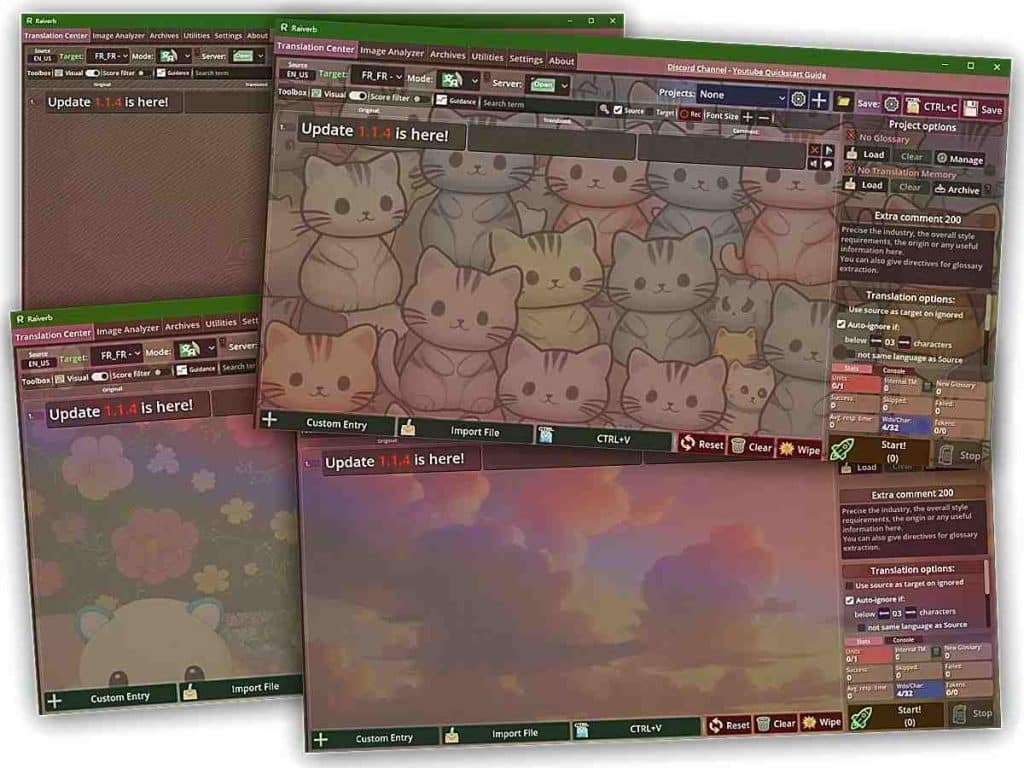
Custom Background

Custom Background

You can now customize the background of the application, and can pick from cute kitties, whimsical clouds, abandoned temples and of course Wawa United™ themed backgrounds. We firmly believe this is a huge step in the right direction for the constant innovation in the field of computed-assisted translation.

More seriously, on to other features:

Subtitles Support

Subtitles Support


– SRT and ASS subtitle formats are now supported. You can import both formats and have them translated and saved.
This comes with a few upgrades that will benefit other formats as well:
– You can now chose to get the Character Length as an option in the Imported interface. What this means is that you’ll be able to tell Raiverb to limit the character length of a translation to less or more than the source length. This is enabled by default for subtitles.

Important note: currently, Raiverb has a Context feature, which can be toggled for processing long-form content (articles, novels, or subtitles), where context comes from the semantics of the content, therefore where Translation Memories may not be relevant.
This Context feature extracts the content around the previous and next Translation Units. This works well, but this approach is not entirely satisfying. Moreover, it is a very resource-consuming feature.
A more specific and efficient approach for long-form text is being worked on. This hopefully will be deployed in the next update.

Delimiters Support for CSV and Clipboard content

捕获d

– CSV and clipboard-imported content now get a delimiter option.
What this means is that CSV and clipboard formats are now more flexible and better supported.


If you don’t know what this means, here’s a short explanation:
When you save a file into .csv or when you do CTRL+C on a spreadsheet, the same thing happens: your sheet is converted into plain text, and the way the computer knows how to split this text into a grid, is with the use of delimiters. We have one delimiter for the rows, and one delimiter for the columns. That’s how you can copy and paste sheets from one software to another.
Now, the catch is: not all software use the same delimiters. Previously, Raiverb assumed the clipboard would use \n, which means line break, and \t, which means increment. That’s the most common case, but that’s not the only one, and that is why now you have the choice.

Single Unit Mode

It is now possible to translate a single Unit. The toolbox at the right of each Translation Unit now shows a button:

Allowing you to translate the Translation Unit.
You can also re-translate the Unit, if you think the translation could use an alternative. The Translate button replaces the WYSIWYG button, that was not really useful since the top Toolbox already provides a WYSIWYG toggle. Therefore, it has been replaced.

Batch processing will skip a Unit that has been translated.

Raiverb 1.1.4 – Bug fixes

A good bunch of bugs got fixed.

Raiverb 1.1.3 Now Live

Raiverb 1.1.3

Raiverb 1.1.3 is a maintenance update with mostly bug fixes and UI improvements. Here are the changes.

Improved display for the Archives Manager

The Archives Manager now features an explorer, where projects and batches are organized. The navigation is made simpler and faster.

Improvements to the Importer


The importer interface will now be faster, the software will not freeze anymore when importing a big file.

Misc

Changing the font size in the Translation Center, the Archives Manager and the WYSIWYG editor will now be persistent.

Bug fixes

Glossary Manager issues have been fixed.

To download the latest version, head to the “Download” section.

Raiverb 1.1 Known Issues

CREATOR

Here is a list of known issues collected from feedback, a fix will be posted at a later date:

  • When saving a XLSX document, the “Prompt” option does not get printed even if the option is selected.
  • Upon pasting content from the clipboard, the message “⚠Sorry, couldn’t find content to extract in this file…” may appear erroneously before the content gets displayed, instead of a waiting prompt. This leads users to falsely believe importing content has failed, when it is still loading in the background.
  • In the Translation Unit Info dialog, the language type does not get displayed properly.
  • Some glossary matches are not properly displayed in the WYSIWYG Editor.

Raiverb 1.1 Now Live (Steam)

Raiverb 1.1

Raiverb has been bumped to version 1.1, which is a feature-packed update:

New Feature: Offline LQA

A new LQA tool is now available in the Translation Center. It will allow you to perform meta-linguistic checks on your text.

LQA Mode

You can now import a source and target, then check for:

  • Inconsistencies in the glossary.
  • Inconsistencies in Translation Memory matches. You can chose to only verify perfect matches or to print warnings if a match in Translation Memory seems to differ too much from your translation.
    Inconsistencies in numerals and locale (are the numbers consistent, do they correspond to the chosen target language/culture variant).
    Check if the target language corresponds to the translation.
    Check the correspondence of tags (html tags or BBcode).

To run an LQA job, simply chose the LQA option under “Mode” and run your job just like you would do for any other mode.

LQA


This new feature is entirely free and runs offline.

New Feature: WYSIWYG Editor

A WYSIWYG editor has been added to the Utilities panel. It will allow you to edit BBCode or HTML rich code visually without seeing all the tags.
The idea was to facilitate editing or most likely reviewing text with a lot of tags and variables.

Translate Mode

The editor will allow you to:

  • Visualize code or tags-heavy text in a more readable fashion while being able to edit the text
  • Capitalize or minimize a selection.
  • Remove or add tags on a selection easily.
  • Split a line by length or any delimiter you want.
  • Highlight glossary entries from the Translation Center.
  • Send your text to the Translation Center, or copy it.
  • Language detection is automatic.

Glossary Manager


The glossary manager has been revamped.

  • You can now see both imported entries and auto-extracted entries.
  • You can revise and accept auto-generated entries into the regular glossary (requires a project).

Language Detection

Language detection has been improved and languages have been added. It has also been optimized to run faster, making Raiverb faster overall.
Matches have been improved for Slavic languages.

Translation Center:

You can now chose whether to fill in the source as a target in ignored units.
CTRL+V is now supported for import.

Archive Manager:

  • A new toggle in the toolbox allows to display spaces and tabulations.

Bug Fixes:

  • Fixed several issues with spreadsheets export.
  • Fixes several issues with the Archives.
  • Resolved “ERROR_2” appearing more than it should.
  • Fixed an issue with matching algorithms for certain languages.
  • Fixed a large number of small bugs and issues.

Along with all these changes, the User Manual has been updated.

Raiverb Definitive Release (after a delay)

CREATOR

Due to some issues that needed to be sorted out first, the release of Raiverb had to be delayed a little bit. Well, the good news is we could finally get the thing rolling, and the software will release on Steam by April 9th, and hopefully the standalone version will release at the same time.

A little note about this: the Standalone version and the Steam version will be completely separate and the Raiverb accounts you create on the website will not be able to log onto the Steam client and vice versa.

Raiverb is translation productivity software that combines AI with traditional CAT software features, in order to produce accurate and context-aware translations for projects of any length. It enables in-app review and proofreading, supports image importing, and is compatible with all industry-standard formats.